In this comprehensive guide, we’ll explore the 10 best free logo design apps for small businesses to use in 2026 to create memorable brand identities.
Additionally, it requires the help of a professional logo maker app to create a professional logo for any small business looking to establish a strong brand identity and build a solid brand presence.
However, hiring a professional designer can be expensive, especially for startups and small enterprises working with tight budgets. So here are some free logo maker apps that make the process easier and faster.
List of 10 best free logo design apps for small businesses
1. Logowiz – AI-based logo creation app
2. Canva logo maker – All-in-one design solution
3. Arvin – Create logo with AI
4. Wix Logo Maker
5. Fluer – Ultimate solution for logo creation
6. Impresso – Create AI-based logo designs
7. Desygner Logo Maker
8. DesignEvo – User-friendly logo design app
9. Logo maker shop – Library of templates & icons
10. Logo maker pro – Perfect for businesses
1. Logowiz – AI-Based Logo Creation App
Logowiz stands out as one of the most comprehensive free logo design platforms specifically created for small businesses. This innovative app goes beyond simple logo creation, offering a complete brand identity solution that empowers entrepreneurs to build professional logos effortlessly.
Pros:
- Completely free with no hidden costs or watermarks
- AI-powered design assistance and recommendations
- Complete brand development suite beyond just logos
- Multi-platform accessibility (web, iOS, Android)
- Unlimited downloads and commercial usage rights
- Excellent customer support and learning resources
- Regular updates and new template additions
Cons:
- Some AI-powered features and templates are behind the subscription plan.
Key Features:
1. Extensive Template Library: Logowiz boasts over 10,000 professionally designed logo templates across dozens of industries. Whether you’re in tech, healthcare, food service, or retail, you’ll find templates that resonate with your business sector.
2. Advanced Customization Tools: The platform offers sophisticated editing capabilities, including:
- Custom color palettes with brand color suggestions
- Typography library with 500+ professional fonts
- Icon library featuring over 50,000 symbols and graphics
- Layer management for complex design elements
- Gradient and texture options
3. AI-Powered Design Assistant: Logowiz incorporates artificial intelligence to help users make design decisions. The AI analyzes your industry and business name to suggest relevant colors, fonts, and layouts that align with current logo design trends.
4. User Experience: The interface is designed with beginners in mind, featuring a drag-and-drop editor that makes logo creation intuitive. The platform includes step-by-step tutorials and design tips to guide users through the process.
5. Mobile Optimization: Logowiz offers both web-based and mobile app versions, allowing users to create and edit logos on the go. The mobile app maintains full functionality while optimizing the interface for touch interaction.
Logowiz understands the unique challenges small businesses face and makes it easy to create a business logo with AI.
The platform provides a free plan, and no limitations on downloads. Users maintain full ownership of their designs and can use them for any commercial purpose.
Platform: Android, iOS, website
Rating: (4.8/5)
2. Canva Logo Maker
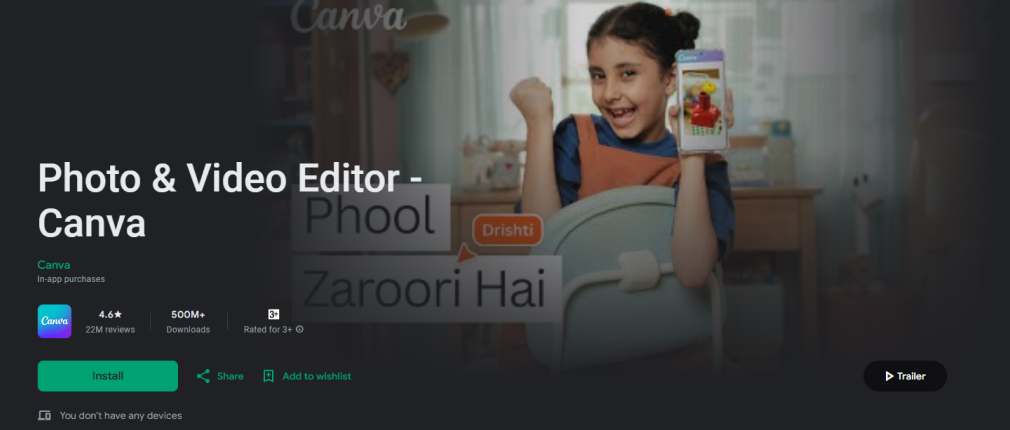
Canva has established itself as a household name in the design world, and its logo maker is particularly popular among small business owners. Popular among small businesses, marketing departments, and social media teams, Canva offers features that are as easy to use as they are numerous – totally free.
Key Features:
- Thousands of customizable logo templates
- Drag-and-drop editor with intuitive controls
- Extensive library of icons, shapes, and graphics
- Brand kit functionality for consistent branding
- Integration with other Canva design tools
Best For: Small businesses that need a logo quickly and want access to other design tools for marketing materials.
Platform: Android, iOS, website
| Pros | Cons |
|---|---|
| User-friendly interface | Limited originality |
| Wide template library | Some features paid |
| Customizable elements | Not fully vector-based |
| High-resolution downloads | Limited design control |
| Versatile usage | Not ideal for complex designs |
3. Arvin – Create Logo with AI
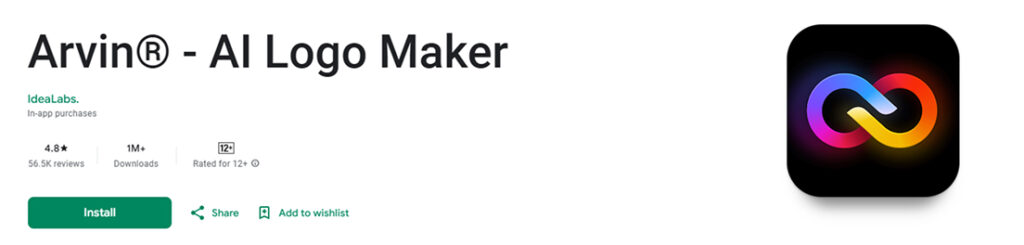
Arvin is an AI-powered logo maker that generates multiple logo designs in seconds based on your brand description. This innovative app leverages artificial intelligence to create personalized logos that match your vision without requiring design skills.
Key Features:
- Instant logo generation from text descriptions
- Multiple design variations to choose from
- AI-powered customization options
- Ready-made templates for quick starts
- Font, color, and icon customization
- High-resolution downloads
- Personal avatar and icon creation
Platform: Android, iOS
| Pros | Cons |
|---|---|
| Quick logo creation in seconds | Limited manual control over designs |
| AI-powered personalization | AI suggestions might not always match expectations |
| No design skills required | Fewer customization options compared to traditional editors |
| Multiple style variations | Some features are paid to use |
| Template-based starting points | Complex to understand features |
4. Wix Logo Maker

Wix Logo Maker uses artificial intelligence to create personalized logo designs based on your business information and style preferences. As a part of the Wix ecosystem, it utilizes Artificial Intelligence (AI), allowing you to create and customize a professional logo for free. It also integrates seamlessly with website-building tools.
Key Features:
- AI-powered logo generation
- Customization options for colors, fonts, and layouts
- Integration with the Wix website builder
- Multiple file formats for download
- Brand package creation
Best For: Businesses planning to build a Wix website and want integrated branding.
Platform: Android
| Pros | Cons |
|---|---|
| AI-powered suggestions | Limited manual control |
| Seamless website integration | Best value with the Wix ecosystem |
| Professional results | Limited to one platform |
5. Fluer AI Logo Maker

Fluer AI Logo Maker allows users to effortlessly create stunning, professional logos with AI in seconds. This app focuses on simplicity and speed, making it perfect for busy entrepreneurs who need quick results.
Key Features:
- AI-powered logo generation
- Professional template library
- Quick customization tools
- Multiple export formats
- Color and font modifications
- Icon and symbol library
- Instant preview options
Platform: Android, iOS
| Pros | Cons |
|---|---|
| Creates professional logos in seconds | Limited advanced editing features |
| Simple, intuitive interface | Fewer templates than competitors |
| AI-powered design suggestions | Basic customization options |
| Quick turnaround time | Not all features are in the free plan |
| Mobile-optimized experience | Support is not good |
6. Impresso – Create AI-based logo designs

Impresso combines logo generation with comprehensive video and marketing content creation tools. This versatile app is perfect for businesses that need both logo design and content creation capabilities.
Key Features:
- AI logo generator with multiple styles
- Video maker with templates, filters, and effects
- Social media content creation tools
- Brand consistency across all materials
- Multiple export formats and sizes
- Template library for various industries
- Advanced editing tools
Platform: iOS, Android
| Pros | Cons |
|---|---|
| Complete marketing toolkit beyond just logos | It can be overwhelming for users who only need logos |
| Professional video creation capabilities | Higher learning curve due to extensive features |
| Consistent branding across all content | Premium pricing for full functionality |
If you’re looking for AI logo generators that create logos in just seconds, we’ve covered a list of the best apps that you should check out.
7. Desygner Logo Maker

Desygner Logo Maker is part of a comprehensive design platform that offers logo creation alongside other marketing materials. This app emphasizes ease of use while maintaining professional design standards.
Key Features:
- Thousands of customizable logo templates
- Drag-and-drop design interface
- Brand kit creation and management
- Team collaboration features
- Multi-format export options
- Integration with other Desygner tools
- Cloud storage and synchronization
Platform: iOS, Android
| Pros | Cons |
|---|---|
| Easy-to-use drag-and-drop interface | Limited advanced design tools |
| Good template variety | Premium features require a subscription |
| Team collaboration capabilities | Templates can feel similar to competitors |
| Cloud storage and sync | Not regular design updation |
| Integrated design platform | Poor customer support |
8. DesignEvo – User-Friendly Logo Design App
DesignEvo offers a vast library of templates and icons, focusing on providing users with extensive customization options for creating unique logos that stand out in the marketplace.
Key Features:
- Over 10,000 professionally designed templates
- Extensive icon and symbol library
- Advanced font customization options
- Shape and effect tools for unique designs
- Color palette suggestions and tools
- Multiple export formats and sizes
- Cloud saving and project management
Platform: Android, iOS
| Pros | Cons |
|---|---|
| Large template and icon selection | The interface can feel cluttered |
| One-time payment option available | Limited AI-powered features |
| Decent customization capabilities | Fewer modern design options |
| No monthly subscription required for basic use | Premium features require a subscription |
| Cloud project saving | Limited editing features |
9. Logo Maker Shop

Logo Maker Shop specializes in creating professional logos with a focus on small business needs. The app offers a good balance of simplicity and functionality for entrepreneurs.
Key Features:
- Industry-specific logo templates
- Easy-to-use editing tools
- Custom color and font options
- Icon and graphic library
- Multiple export formats
- Quick logo creation process
- Business card integration
Platform: iOS, Android
| Pros | Cons |
|---|---|
| Simple, straightforward interface | Limited advanced customization |
| Quick logo creation process | Smaller template library |
| Good template organization by industry | Basic export options |
| Reasonable pricing | The result might not satisfy your needs |
| No complex features to overwhelm beginners | Not regular updates, and poor support |
10. Logopit – Logo + Graphic Design App

Logopit (Logo Maker Plus) is a versatile Android app that helps you create logos and graphic designs quickly using thousands of graphic elements, icons, and customizable options. Developed by Logopit – Logo Maker & Graphic Design Creator, the app is designed for both beginners and casual users who want a one-stop tool for logo creation and social media graphics.
Key Features:
- Offers thousands of icons, symbols, and monograms across multiple categories.
- Advanced customization like applying colors, gradients, textures, shadows, borders, and even 3D depth to icons and shapes.
- It lets you import your own photos, enhance with filters, blend images, and embed pictures inside icons for creative results.
- Allows you to save your designs as drafts to revisit and refine later, ensuring your work is never lost.
- Beyond logos, you can design social media banners, posters, YouTube thumbnails, and more using ready-made templates.
Platform: Android
| Pros | Cons |
|---|---|
| AI-powered design suggestions | Most designs are template-based |
| Seamless website integration | Many features need to be updated |
| Professional design quality | Lack of strategic branding |
| Complete brand package creation | Requires in-app purchases |
| User-friendly questionnaire process | Ads in the free version |
These are the top-notch free logo design apps for small businesses available on both platforms, Android and iOS. Additionally, check out this guide if you want to learn more about what types of logos you can create.
Quick Comparison between Free Logo Design Apps for Small Businesses
| App Name | Description | Best For | Key Features |
|---|---|---|---|
| Logowiz | Easy-to-use AI-powered logo maker designed for small businesses and entrepreneurs. | Startups, small businesses, freelancers | Best logo suggestions, customizable templates, branding mockups, free to start |
| Canva Logo Maker | Popular all-in-one design app with drag-and-drop logo editor and vast template library. | Small businesses & social media branding | Thousands of templates, Brand Kit, drag-and-drop editor, integrated design tools |
| Arvin | AI-first logo generator that creates unique designs quickly based on user prompts. | Entrepreneurs who want fast AI-generated logos | AI logo creation, editable designs, brand assets, quick customization |
| Fluer AI Logo Maker | Modern AI logo tool focuses on sleek, minimalist design outputs. | Tech startups & modern brands | Clean logo design templates, easy editing options |
| Impresso | Logo and branding app with a focus on stylish, creative designs for businesses. | Creative entrepreneurs & lifestyle brands | Trendy templates, customization tools, social media-ready designs |
| Wix logo maker | AI logo design tool integrated with the Wix website builder for seamless branding | Entrepreneurs building websites with Wix | AI-powered logos, customization, branding kit, and direct integration with websites |
| Desygner Logo Maker | Versatile design tool with branding features beyond just logos. | Businesses wanting complete branding solutions | Templates for logos + marketing materials, Brand Kit, drag-and-drop editor |
| DesignEvo | Free online logo maker app with over 10,000 ready-made templates. | Small businesses & freelancers | Huge template collection, customizable icons/fonts, cloud save, easy use |
| Logo Maker Shop | Device-focused app with high-quality templates and fonts for logos. | Perfect for Android users | 1,000+ logo templates, stylish fonts, easy-to-use editor |
| Logopit – logo + graphic design app | Mobile-friendly app offering professional logo designs for quick branding needs | Small businesses on the go | Thousands of icons, easy editing, mobile app access, instant downloads |
How to Choose the Right Logo Design App for Your Business?
Selecting the perfect apps for business logo design depends on several factors specific to your business needs:
Design Skills Level: If you’re completely new to design, choose apps with AI assistance or guided creation processes like Logowiz or Wix Logo Maker. More experienced users might prefer the flexibility of Canva or Adobe Express.
Industry Requirements: Some industries have specific design conventions. Look for apps with strong template libraries in your sector. Logowiz and Logopit provide industry-specific options.
Brand Complexity: Simple businesses might need only basic logos, while established companies may require comprehensive brand packages. Consider apps that offer additional branding materials beyond just logos.
Future Scalability: Choose platforms that can grow with your business. Apps with ecosystem integration (like Canva or Wix) offer long-term value as your design needs expand.
Output Requirements: Consider where you’ll use your logo. If you need high-resolution files for print, ensure the app provides suitable export options.
Additionally, we’ve covered a guide on creative business logo ideas for any industry and style that you need to explore.
What are the Best Tips for Creating an Effective Logo Using Free Apps?
If you’re stuck in a process of how to design a logo for any industry, here are some tips you must consider before designing.
1. Start with research
Before opening any design app, research your competitors, target audience, and industry standards. Understanding your market will guide your design decisions and help you create a logo that stands out for the right reasons.
2. Keep it simple
The best logos are often the simplest. Avoid the temptation to include too many elements or overly complex designs. A good logo should be recognizable even at small sizes.
3. Consider color psychology
Colors evoke emotions and associations. Blue suggests trust and professionalism, green implies growth and health, while red conveys energy and passion. Choose the best color combinations for the logo that align with your brand personality.
4. Ensure scalability
Your logo will appear on everything from business cards to billboards. Test your design at various sizes to ensure it remains clear and impactful across all applications.
5. Get feedback
Don’t design in isolation. Show your logo concepts to potential customers, friends, or business advisors. Fresh perspectives can reveal issues you might miss.
6. Think long-term
While trends can be inspiring, avoid overly trendy elements that might look dated in a few years. Aim for timeless design principles that will serve your brand well into the future.
What Advanced Features Should You Look for in Logo Design Apps?
Choosing the right logo app means looking beyond basic templates. Advanced features save time, give you professional control, and make sure your logo works everywhere
Below is a clear, simple guide with short bullet points under each feature so you can scan and pick what matters most to you.
1. AI-powered logo generation & smart suggestions
Modern logo design apps now use artificial intelligence (AI) to simplify the creative process. Instead of starting from a blank canvas, you just enter your business name, industry, and style preferences, and the app generates multiple logo options instantly.
2. Large template library
A strong logo design app should give you access to a wide variety of templates, so you don’t have to start from scratch. A large template library ensures that you’ll find designs that match your industry, style, and brand personality. Whether you want something modern, playful, or minimalist, templates provide a solid foundation that you can customize to make your logo unique.
3. Full customization controls
While templates and AI suggestions are great for getting started, the real value of a logo design app lies in its customization options. A professional logo should reflect your brand’s unique personality, and full customization controls allow you to tweak every element until it’s just right.
From adjusting colors and fonts to resizing icons and changing layouts, customization ensures your logo doesn’t look generic.
4. Mockups & real-world previews
A great logo design app should not only let you create a logo but also show you how it will look in real life. Mockups and real-world previews enable you to instantly place your logo on items such as business cards, T-shirts, signage, websites, or packaging. This feature helps you visualize how your design performs outside the app and ensures your logo looks professional across different mediums.
5. Security, privacy, and data controls
When choosing a logo design app, it’s important to look beyond design features and consider how the platform handles your data security and privacy. Your logo is a key part of your brand identity, and you want to ensure your designs are protected from unauthorized access or misuse. Apps that prioritize security give you peace of mind, allowing you to focus on creativity.
Frequently Asked Questions
When it comes to free logo design for small businesses and any industry, Logowiz stands out. It offers a library of design templates, icons, and fonts, advanced custom logo design tools, an easy-to-share option, and more.
Here are some features you must look for in a free logo design app for small businesses:
1. Easy-to-use templates
2. Custom fonts & colors
3. Icon/shape library
4. High-resolution export
5. Branding tools (business cards, social media kits)
Test your logo at various sizes during the design process. Avoid intricate details that might disappear when scaled down. Focus on bold, simple shapes and ensure text remains legible at business card size.
Several free logo design apps help small businesses create professional logos without hiring a designer. Some of the most popular ones include: LogoWiz, Canva, DesignEvo, Logopit, Impresso, and more.
Yes, most logo design apps allow you to return and customize your designs. However, significant changes to an established logo can confuse customers, so consider evolution rather than a complete redesign.
A logo is a single visual element, while brand identity encompasses your entire visual system, including colors, fonts, imagery style, and voice. Many apps like Logowiz provide complete brand identity packages beyond just logos.
Conclusion
Creating a professional logo for your small business no longer requires a significant financial investment or years of design training. The 10 free logo design apps for Android and iOS we’ve covered offer powerful tools that can help you create memorable, effective brand identities that compete with professionally designed logos.
Logowiz leads our recommendations with its comprehensive feature set, extensive template library, and business-focused approach. However, each app on this list offers unique strengths that might align better with your specific needs, whether that’s Canva’s ecosystem integration, Arvin’s professional tools, or Wix’s AI-powered approach.
Remember that your logo is an investment in your business’s future. Take time to explore these tools, experiment with different approaches, and create a logo that truly represents your brand values and connects with your target audience.