A creative security logo template from Logowiz featuring a winged eagle and shield emblem embodies strength, protection, and authority. Using a security logo maker, you can customize this design to create a bold and professional identity, making it perfect for security firms, law enforcement agencies, and defense-related businesses.
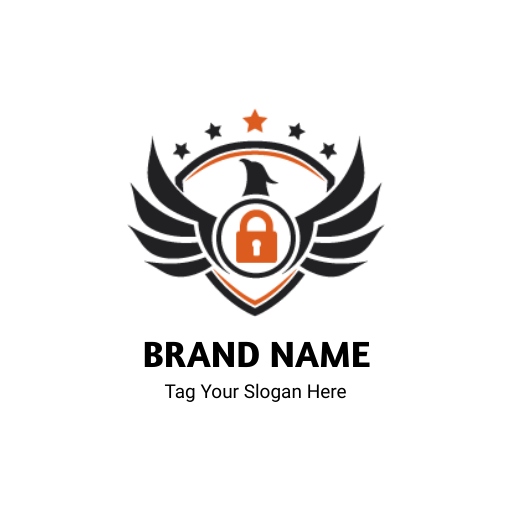
The logo showcases a bold eagle with outstretched wings, symbolizing vigilance and power. A shield with a lock icon reinforces safety and trust, while black and orange add a modern, authoritative touch. This versatile design makes it a modern security logo, working seamlessly across digital platforms, uniforms, and business materials for a strong brand identity.
How Does the Winged Eagle Icon Enhance This Creative Security Logo?
The winged eagle icon is a striking design element that conveys power, authority, and watchfulness. This emblem immediately captures attention, making it a strong centerpiece for a security logo template. Eagles have long been associated with strength and leadership, which enhances the credibility of a security brand.
Symbolizing Strength and Authority
The winged eagle’s commanding presence represents unwavering vigilance and superior protection. Its dynamic posture adds a sense of motion, reinforcing the idea of proactive security.
- The eagle’s wingspan represents a wide-reaching presence, signifying protection and oversight.
- Its sharp eyes reinforce the idea of vigilance, always keeping watch over what matters most.
- The strong posture of the eagle conveys dominance, trust, and the ability to deter threats.
Enhancing Brand Identity
A security firm needs to build trust, and an eagle icon instantly adds confidence to a brand. Customers associate the eagle with high standards, ensuring the business appears dependable and competent. When combined with other security-related elements like a shield or lock, the eagle further amplifies the message of strength and protection.
Making the Logo Stand Out
While this design embraces a bold and modern look, elements like the eagle and shield also align with vintage logo design principles, offering a timeless and classic appeal that resonates with trust and authority.
Why Is the Shield a Perfect Choice for This Creative Security Logo?
The shield acts as an unyielding barrier against threats, making it a fundamental design choice. Often seen in a crest security logo, the shield conveys resilience, stability, and unwavering defense.
Representing Protection and Defense
The shield acts as an unyielding barrier against threats, making it a fundamental design choice. Its structured form conveys resilience, stability, and unwavering defense.
- A shield naturally conveys security, making it an ideal addition to a security firm’s logo.
- It represents a safeguard against threats, creating a sense of reassurance for customers.
- The strong, structured design of a shield ensures that the logo looks balanced and authoritative.
Adding Professionalism and Trust
A well-designed shield enhances the logo’s credibility. It aligns with the branding of law enforcement, cybersecurity firms, and private security agencies. The symmetrical shape of a shield also gives a sense of order and stability, qualities that are crucial for any security service provider.
Complementing Other Design Elements
When paired with the winged eagle and lock icon, the shield ties everything together. It serves as the central element that connects the themes of vigilance, security, and reliability. Its versatility ensures that the logo remains impactful on business cards, websites, and uniforms.
What Role Does the Lock Symbol Play in This Creative Security Logo?
The lock symbol is an essential part of a security logo template, reinforcing the brand’s dedication to safety and restricted access. It provides a direct visual connection to security, ensuring that the logo’s message is clear and effective.
Instilling Confidence and Reliability
A lock icon is a universal sign of security, instantly communicating trustworthiness. Its presence in the logo reassures clients that safety is a top priority.
- A lock immediately conveys the idea of protection, giving clients a sense of trust in the brand.
- It represents secure systems, whether for physical security, cybersecurity, or personal safety services.
- The inclusion of a lock icon makes the logo more relevant to modern security concerns, including data protection and surveillance.
Strengthening Brand Messaging
A security company’s primary goal is to offer protection, and a lock icon visually reinforces that mission. It reminds potential clients that security is at the core of the business, ensuring peace of mind for those who rely on its services.
Increasing Logo Versatility
A lock icon ensures that the logo remains functional across different industries, from home security to corporate protection services. It adapts well to various branding materials, keeping the design relevant in both digital and physical formats. Whether used on marketing materials, uniforms, or official documents, the lock strengthens the logo’s impact.
Conclusion
This security logo template features a winged eagle and shield emblem, symbolizing strength, trust, and professionalism. It establishes an authoritative brand identity while pairing it with a minimalist security logo that balances bold symbolism with modern simplicity, making it ideal for security businesses seeking a strong yet contemporary visual presence.